For pools, spas, aquariums, wine cellars and cold storage — places where the
temperature barely changes, but you want to know immediately when it does.
Years on 2× AA
Adaptive sampling, Matter Sleepy End Device, and threshold reporting keep the radio asleep.
Apple / Google / Alexa
A standard Matter Temperature Sensor — commission by scanning a QR, no app to install.
No cloud
Local Matter over Thread or Wi-Fi. Your data never leaves your home network.
Waterproof probe
DS18B20 in stainless steel, 10 m+ cable possible — drop it in and forget it.
Open source
Built on esp-matter, Apache-2.0 licensed. Single-SoC — no companion MCU.
Honest engineering
Battery math, RF rules and known limitations are documented, not hand-waved.
Why not just buy an Inkbird or Govee pool thermometer (~€25)? Those work fine — but they route your water temperature through the vendor's cloud, app and account. AkvaLink is the same job with no account, no app requirement, and no dependency on a company staying in business.
Companion app
One Flutter codebase, five platforms — live temperature over Bluetooth or Wi-Fi, heating/cooling
rate (°C/h), high/low temperature alerts stored on the device, 24 h / 7 d history, one-click OTA that auto-picks
the right firmware for the connected device, and a demo mode that runs the whole app on simulated pool data —
no hardware needed to try it. Same no-cloud rule as the firmware.
iOS
iPhone / iPad companion app. Build with Xcode on a Mac.
Windows and Android are prebuilt and attached to every GitHub release. The Windows build is unsigned (SmartScreen will warn on first run) and the APK needs "install from unknown sources" — no app-store distribution yet. iOS, macOS and Linux still build from source; there's no Apple or Linux CI to sign/package them.
Apple, Android, Windows and Linux/Tux are trademarks or symbols of their respective owners, named here only to show platform support — the icons above are our own monochrome glyphs, not the official logos.
Download firmware
Prebuilt single-image binaries for the NORA-W40 (ESP32-C6) — always the latest release.
Not sure which? Answer a couple of quick questions
How do you want to reach it day to day?
Do you already have a Thread border router — HomePod mini/2, Apple TV 4K, Nest Hub (2nd gen+), or Echo (4th gen+)?
Want zero extra setup, or do you already run MQTT?
Do you have Wi-Fi to give it, or want a standalone hotspot with no router?
Native Home Assistant API — no MQTT broker needed. Flash once, adopt in the ESPHome dashboard, OTA-update from Home Assistant. Provisioned with Improv over USB serial.
Joins your home Wi-Fi (provisioned once over BLE). Open akvalink-<last4mac>.local in any browser on your LAN. Auto-discovered by Home Assistant via MQTT. Multiple devices get unique hostnames. Needs mains/USB power.
Deep-sleep broadcast — wakes, reads DS18B20, sends one packet to any ESP32 on the same Wi-Fi channel, sleeps. No hub, no provisioning, maximum battery life. Receiver needs an ESP32 sketch.
Flash via USB — click it, pick the serial port, done. No install, no drivers: it flashes straight from the browser over the Web Serial API. Needs Chrome, Edge, or Opera (desktop, v89+) — Firefox and Safari don't support Web Serial, so the button hides itself there.
esptool .bin — the same full merged image, flashed from the command line instead: pip install esptool (a small standalone PyPI package — no full ESP-IDF needed), then esptool --chip esp32c6 write-flash 0x0 <file>.bin. Rather not touch Python? Grab a prebuilt binary from the esptool releases page instead. Note: esptool v5 renamed subcommands with hyphens (write-flash, merge-bin) — v4 used underscores (write_flash); if a copied command errors, that's usually why.
OTA .bin — app partition only. Use for updating within the same variant (BLE→BLE, Thread→Thread, etc.) without touching NVS or commissioning data. Cross-variant OTA is possible but requires a factory reset after. · All releases & changelog
Wi-Fi®, Bluetooth®, Thread® and Matter™ are trademarks of the Wi-Fi Alliance, Bluetooth SIG, Thread Group and Connectivity Standards Alliance — named here only to describe compatibility. AkvaLink is not officially certified by any of them; the icons above are drawn in our own monochrome style, not the organizations' official colored certification logos.
2Update it wirelessly
Already flashed the BLE-only variant? Update it again with no cable at all — this page can fetch and flash new firmware straight over Bluetooth.
Firmware update over Bluetooth
Only works if the device is currently running the BLE-only firmware — it's the only variant with this update service built in. Flashing a brand-new device for the first time? Use USB flash or esptool instead.
Stored on the device itself, in °C. It flags a warning when the water crosses a limit — leave a field blank to switch that one off.
Save
What's actually on the wire — the full GATT service table exposed by the BLE-only firmware, UUIDs and all, if you want to build your own client:
Service
Characteristic
UUID
Properties
Payload
Environmental Sensing 0x181A
Temperature
0x2A6E
Read, Notify
sint16, 0.01 °C, little-endian — the card above subscribes to this
Device Information 0x180A
Manufacturer
0x2A29
Read
"u-blox"
Model
0x2A24
Read
"AkvaLink NORA-W40"
Firmware Revision
0x2A26
Read
"{version}-{variant}" — what "Flash latest firmware" compares against
Battery 0x180F
Battery Level
0x2A19
Read
uint8, 0–100 % — the read fails until a real measurement exists, so clients show "unknown" instead of a made-up level. No battery-sense divider is fitted yet; enable CONFIG_AKVALINK_BATTERY_ADC once one is.
AkvaLink (custom) …6c0001
Uptime
…6c0002
Read
uint32, seconds since boot
Device name
…6c0003
Read, Write
UTF-8 string, saved to NVS, takes effect next reboot
Alert high
…6c0004
Read, Write
sint16, 0.01 °C, saved to NVS, 0 = disabled
Alert low
…6c0005
Read, Write
sint16, 0.01 °C, saved to NVS, 0 = disabled
AkvaLink OTA (custom) …6c0010
Control
…6c0011
Write, Notify
0x01 BEGIN / 0x02 END / 0x03 ABORT; notifies [opcode, result]
Data
…6c0012
Write, Write-no-rsp
Raw firmware chunks, in order — used by "Update firmware over Bluetooth" above
The custom AkvaLink and AkvaLink OTA services share one 128-bit base UUID, f0a00001-6e40-4a71-9b2c-6b6e696c00XX — only the last byte (shown above as …6cXX) changes per service/characteristic. Full contract in docs/CONNECTIVITY.md.
Under the hood
Curious how it actually works? Silicon options, wiring, battery math, the protocol flow and every build variant — the deep technical detail starts here.
One firmware family, more silicon
Same Matter/BLE app, same web & app frontend — AkvaLink isn't tied to one chip.
Everything on this page is the NORA-W40 build; other modules are landing over time.
NORA-W40 Available now
Espressif ESP32-C6 — Wi-Fi 6, Thread, BLE 5.3. The flagship build documented below.
NORA-B2 In development
Nordic nRF54L — BLE, Thread, Matter. A non-Espressif option, for teams that need a second silicon source or specific supply-chain sourcing requirements.
System architecture
Zoomed out from the wiring diagram below — how a reading gets from the probe to your phone, and why nothing in between is a cloud server.
Every arrow above stays on your local network or a direct Bluetooth link — the same no-cloud rule as the rest of AkvaLink.
Hardware
One tiny module, one sensor, one pull-up resistor.
Component
Part
Why
Module
NORA-W401 / NORA-W406
Wi-Fi 6 + Thread + BLE in one module
MCU
ESP32-C6 (RISC-V @ 160 MHz)
Inside NORA-W40
Sensor
DS18B20 (stainless probe)
±0.5 °C, 12-bit (0.0625 °C), 1-Wire, ~$3
Power
2× AA alkaline (or 18650 Li)
~5–7 years realistic on 2× AA (Thread SED, pool conditions)*
GPIO15 → DS18B20. One 4.7 kΩ pull-up. GPIO9 (BOOT) doubles as a re-provisioning button. Dashed box = future battery ADC circuit (R1/R2 voltage divider, 390 kΩ / 100 kΩ).
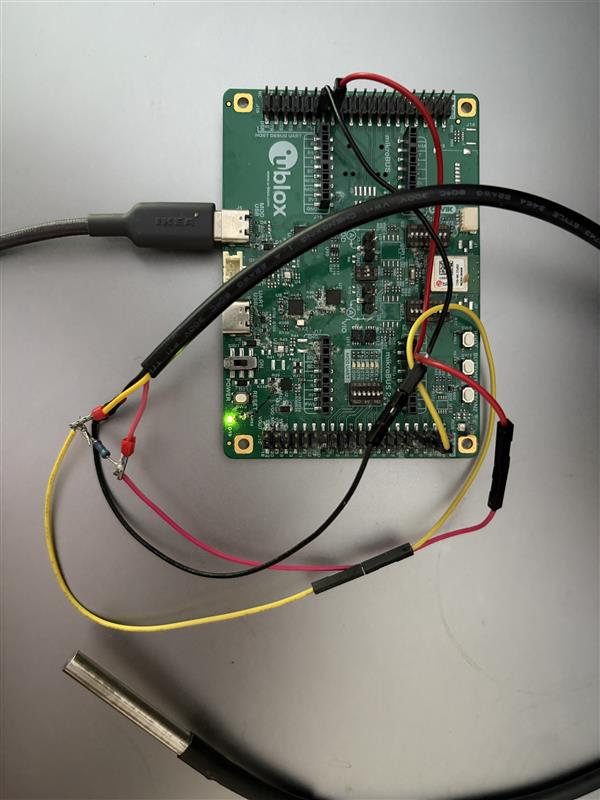
Real build: EVK-NORA-W40 with the DS18B20 probe wired to GPIO15.
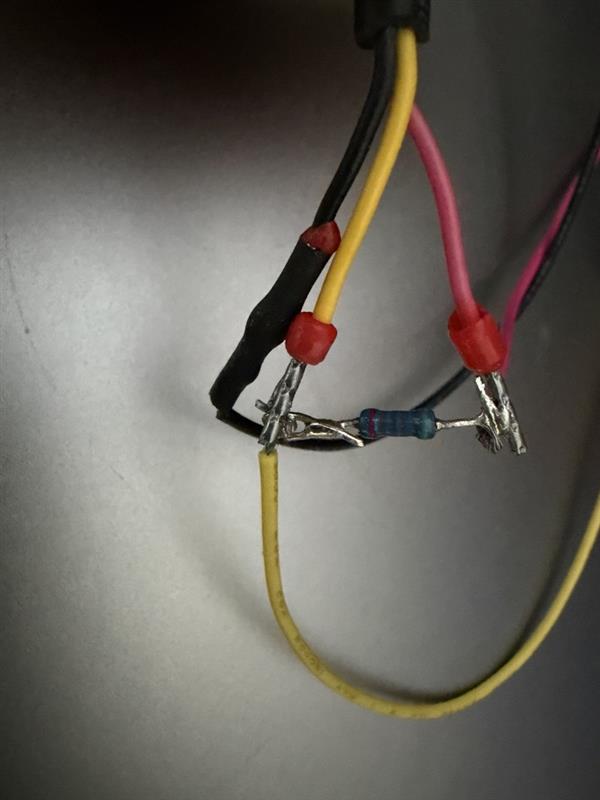
The 4.7 kΩ pull-up, soldered in-line and heat-shrunk right at the sensor cable splice.
Where to get it: the EVK-NORA-W40 dev kit exposes every pin on a breadboard-friendly header — no PCB design needed to get started. DS18B20 stainless probes are a common ~$3 part, widely sold on Amazon, AliExpress and electronics distributors — for salt-chlorinated pools, look for 316 stainless specifically; 304 pits in chlorinated salt water over time. No production enclosure or one-click "buy a finished sensor" option yet — see the roadmap below.
Accuracy note: the DS18B20's 0.0625 °C resolution is not the same as 0.0625 °C accuracy — the datasheet spec is ±0.5 °C. Placement matters more than resolution: a probe on a sun-heated cable, near the surface, or shallow in the water reads faster and drifts higher than the bulk water temperature; submerge it at a representative depth away from direct sun and returns/jets for a reading you can trust.
Battery life
Heated pool at 28–29 °C with a 0.25 °C report threshold. Leading with the realistic number for each cell: alkaline (AAA/AA) self-discharge and Li-ion (18650) calendar aging cap real-world life at roughly 5–7 years no matter what the draw-limited model alone predicts, so that cap is shown wherever the model overshoots it. CR2477 (lithium primary) has the best shelf life of the four and needs no such cap — its model figure already is the realistic one.
Battery
Thread SED
Wi-Fi (TWT)
Wi-Fi (disconnect)
CR2477 (1000 mAh)
~5 years
~6 months
~3.3 years
2× AAA (1200 mAh)
~5–6 years
~8 months
~4 years
2× AA (2800 mAh)
~5–7 years (model: ~12 years)
~1.8 years
~5–7 years (model: ~9 years)
18650 Li-ion (3400 mAh)
years, not decades (model: ~15+ years)
~2.2 years
years, not decades (model: ~11 years)
The italic (model: ...) figure is the theoretical, draw-limited ceiling — shown only where it's materially higher than the realistic number. Alkaline cells self-discharge regardless of load; Li-ion calendar-ages and self-discharges faster still, so "years, not decades" replaces a precise figure until a real PPK2/Joulescope measurement exists. Real measurement is on the roadmap.
Coin-cell (CR2477) builds: coin cells fail on peak current, not capacity. A Wi-Fi or Thread TX burst can pull a few hundred mA, more than a CR2477's internal impedance likes — add a bulk capacitor (a few hundred µF) across the module's supply rail, or TX bursts will brown out the regulator.
How it works
Everything runs on the one ESP32-C6 inside NORA-W40 — no companion MCU.
1
Sense
Read the DS18B20 over 1-Wire with adaptive sampling — fast while changing, slow when stable.
2
Gate
Only report when the temperature moves past a threshold, so the radio stays asleep.
3
Report
Push the reading over Matter — Thread (Sleepy End Device) or Wi-Fi (TWT).
4
Show
It appears in Apple Home, Google Home or Alexa as a standard temperature sensor.
Build variants
One codebase, one SoC — pick the network at build time.
Variant
Flag
Stack
Matter / Thread (default)
(none)
esp-matter, OpenThread, BLE commissioning
Matter / Wi-Fi
--wifi
esp-matter, Wi-Fi, BLE commissioning
BLE-only
--ble
NimBLE GATT — no hub, no router
Wi-Fi AP (mains/USB)
--ap
SoftAP “AkvaLink” + captive web page, any phone; no router needed
Wi-Fi station (mains/USB)
--station
Joins home Wi-Fi (BLE-provisioned), unique akvalink-<last4mac>.local + HA MQTT autodiscovery; no hub
Sensor test
--sensor
Read & log the probe only
Serial terminal
Plug the board in over USB and read its log right here — no PuTTY, no idf.py monitor, nothing to install. Fixed at 115200 baud, 8-N-1, no flow control, which is what every AkvaLink build uses.
It also watches the log for the Matter commissioning code and redraws it below, big and dark-on-white, so your phone camera can actually read it.
Connect serial portReset boardCopySave .txtClearNot connected
Connect a board, then press Reset board — the QR code is only printed at boot.
Matter commissioning code
Scan this with Apple Home, Google Home or Alexa to add the sensor to your home.
One program per port. Disconnect here before using Flash via USB or idf.py monitor — the operating system only lets one of them hold the serial port at a time.
Reset board pulses the DTR/RTS lines the same way esptool does, which reboots the module without unplugging it. The QR code, firmware version and sensor ID are all printed during those first two seconds, so this is usually the quickest way to see them.
The terminal only listens. It never sends anything to the device, and that's deliberate: accepting commands would mean a task sitting awake on the serial port, which is exactly what the multi-year battery life depends on not happening. Use Bluetooth or the device's own web page to change settings. Needs Chrome, Edge, or Opera (desktop, v89+) — Firefox and Safari don't implement the Web Serial API, so the card hides its buttons there.
Security
What AkvaLink protects — and what it doesn't. No cloud means less to defend, but it's not nothing.
No cloud, no accounts
Nothing leaves your network. There's no server to breach and no account to leak.
BLE OTA is unsigned
The custom BLE update service accepts any image sent to it — there's no cryptographic signature check today. Anyone within Bluetooth range can push firmware. Fine for a hobby device on your own bench; don't treat it as the only barrier for anything sensitive.
The Wi-Fi AP variant is open
The --ap build's SoftAP has no password by design (any phone, zero setup). Its exposure is limited to whoever is in Wi-Fi range and the local captive page — the same trust model as many travel routers and IoT setup hotspots.
Matter/Thread commissioning
Standard Matter PASE/CASE commissioning via the printed setup code — the same security model as any other Matter device, not something AkvaLink adds or weakens.
ESP-NOW is unencrypted
The ESP-NOW variant broadcasts temperature readings in the clear with no encryption or authentication. Anyone in range can read them — or spoof a fake reading. Fine for a hobby sensor; not a fit for anything adversarial.
Station Wi-Fi + MQTT
The station build's local web page (akvalink.local) has no login. If your MQTT broker needs a username/password, it's embedded in the broker URL and compiled straight into the firmware image — anyone who extracts the binary can read it. Use a broker on a trusted LAN, or a dedicated low-privilege MQTT account.
Code signing policy
The Windows companion app download is currently unsigned. AkvaLink's plan is free Authenticode signing via SignPath.io (certificate by SignPath Foundation) — see the full code signing policy for what's signed, by whom, and how to verify it.
Software bill of materials
Exact versions baked into this release — check them against public CVE databases yourself, we don't sit on advisories.
Component
Version
Role
ESP-IDF
v5.5.5
Espressif's SDK — build system, drivers, power management
esp-matter / connectedhomeip
release/v1.5
Matter (CHIP) application stack
OpenThread
bundled with ESP-IDF v5.5.5
Thread mesh networking
lwIP
2.2.0
TCP/IP stack (Wi-Fi variants)
mbedTLS
3.6.6
TLS/crypto — Matter PASE/CASE, Wi-Fi security
NimBLE
bundled with ESP-IDF v5.5.5
Bluetooth Low Energy host stack
Versions are pinned per firmware release. See the exact release tag on GitHub, or read the Firmware Revision characteristic (Device Information service, see the GATT table above) off a running device.
Product design Concept
A design language for the physical products AkvaLink doesn't ship yet — a sensor float and an e-ink display receiver. Not the hardware you can buy today; a reference for where it's headed.
Dieter Rams at Braun
As little design as possible, honest about what the device can measure, understandable at a glance, built not to date.
Retro Palm Springs style
Mid-century desert modernism built around a strong sun and a swimming pool — flat shade planes, breeze-block vents, the pool-turquoise-against-stucco palette.
One signal colour
Everything is bone, paper and ink — except alerts, deltas and the one physical button, which get a single accent colour and nothing else does.
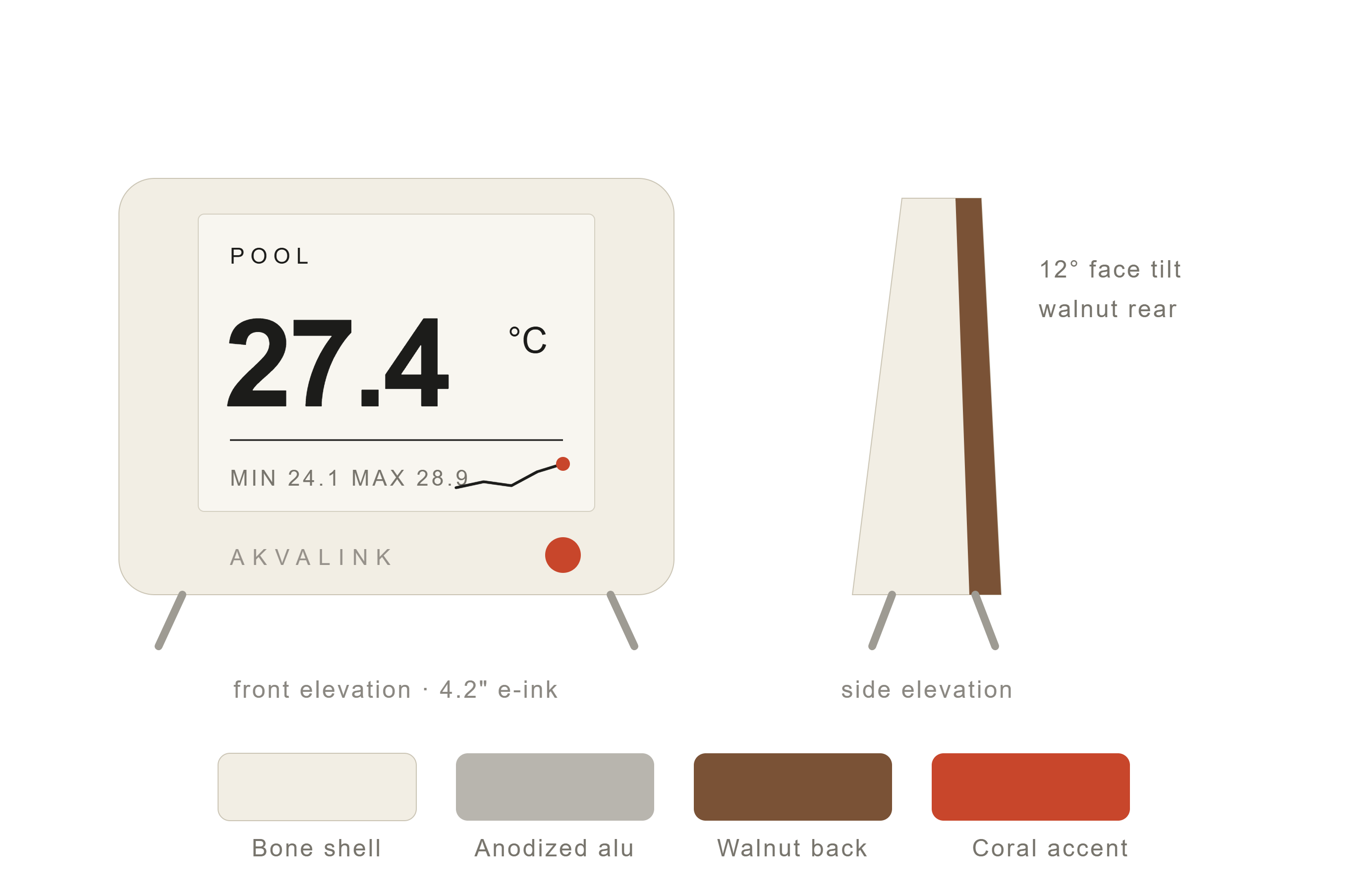
E-ink display concept — the age of the reading (“updated 2 min ago”) is deliberately as prominent as the number itself. Nothing here is final hardware.
Display receiver — bone shell, anodized-alu frame, walnut back panel, tilted 12° so it reads from across a pool deck.
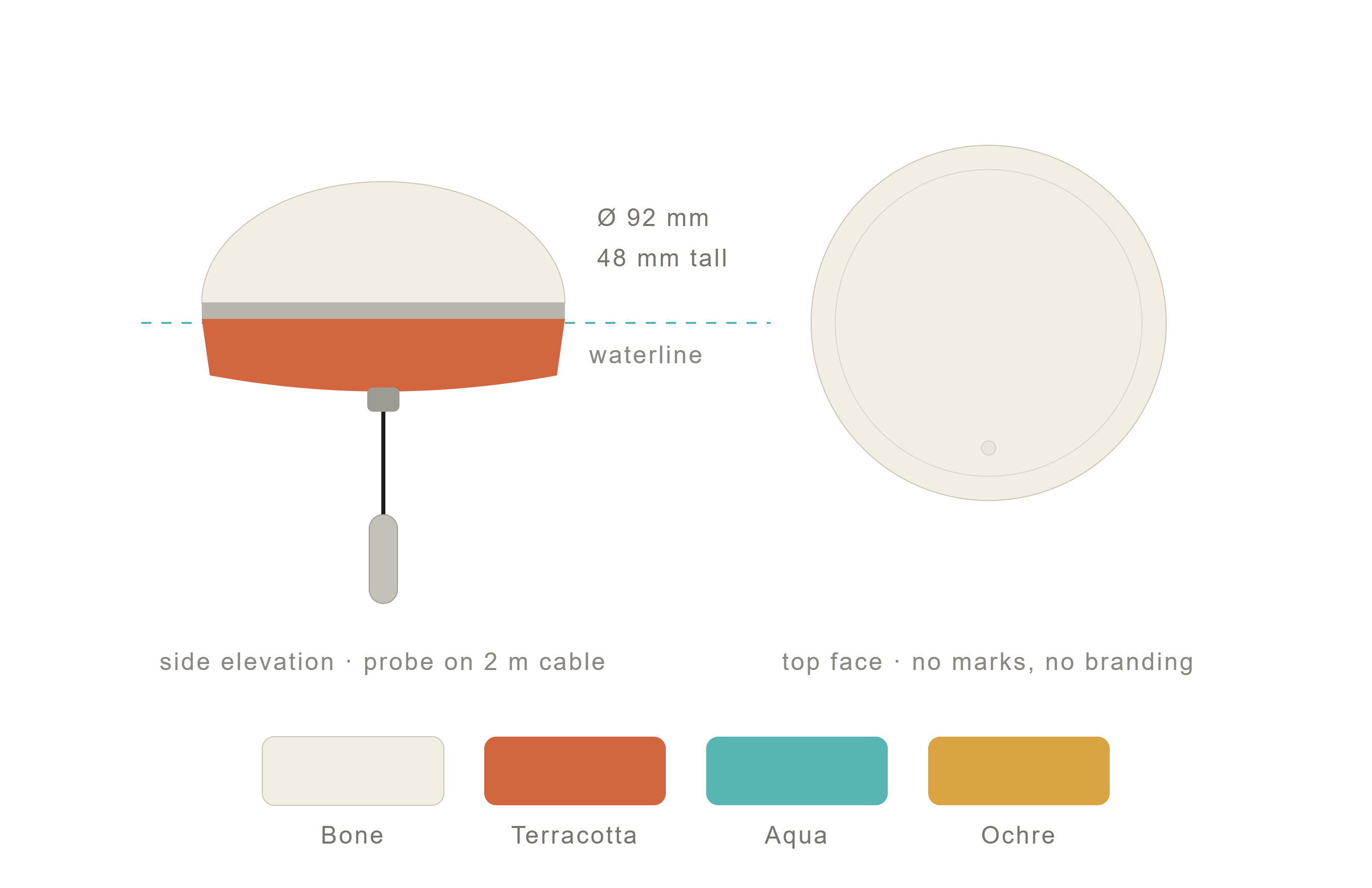
Sensor float — sits right at the waterline, unmarked top face; colour is the only variation between units.
Early industrial-design sketches, not final hardware — materials and colourways are still open questions (see the doc below).
Full write-up — palette, typography, the honesty rules behind the freshness stamp, and the two enclosures (sensor float vs. display receiver) — in docs/DESIGN_LANGUAGE.md.
Status & roadmap
Working today, and where it's headed.
✓Matter Temperature Sensor over Thread (single-SoC)
✓Matter Temperature Sensor over Wi-Fi
✓Adaptive sampling + threshold reporting
✓Light sleep + DFS + flash power-down
✓DS2482 Click board (long-cable variant)
✓Scannable setup QR in the boot log
✓Standalone BLE GATT variant (no hub)
✓Live temperature in the browser (Web Bluetooth)
✓BLE firmware update (custom GATT over esp_ota)
✓Wi-Fi AP variant — open hotspot + captive page, any phone (mains/USB)
✓Wi-Fi station — BLE-provisioned, joins home Wi-Fi, page at akvalink.local, Home Assistant MQTT autodiscovery (mains/USB)
✓ESP-NOW broadcast — deep-sleep sensor, no hub, no provisioning
✓ESPHome / Home Assistant native API variant (adopt-and-customize YAML, dashboard OTA)
✓Native companion app (Windows/Linux/macOS/Android/iOS) — live temperature + one-click OTA
✓Temperature alerts — high/low limits set from the browser or the app, stored on the device; the Wi-Fi station build pushes crossings to Home Assistant over MQTT
✓24 h / 7 d history sparkline — on the device's own page and in the app
✓Heating/cooling rate (°C/h) — on the device's own page and in the app
✓App demo mode — the full app on simulated pool data, no hardware needed
✓Matter keepalive report so a dead-flat sensor isn't shown as offline
▹Signed OTA images (ESP-IDF secure app verification)
▹Real power measurement + deep sleep
▹E-ink display (big-digit, battery, trend) — receiver firmware already listens for ESP-NOW sensors; panel driver next
▹Battery voltage — the firmware side is in but off by default; no board has the sense divider fitted yet, so the level reads as unknown
▹Waterproof production enclosure (IP67)
▹NORA-B2 (Nordic nRF54L) port — BLE/Thread/Matter, non-Espressif silicon